Notifications
Git Workflow can send local desktop notifications when the main Claude Code or Codex turn ends and when someone submits a review on an open pull request you authored. Every channel is opt-in. The feature never changes a pull request, posts a review, or modifies global host configuration.
Quick start
Section titled “Quick start”Add the channels you want to .git-workflow/config.yaml:
notifications: agentComplete: true prActivity: true sound: GlassCheck the installation without sending a notification or querying pull requests:
/notifications --doctor # Claude Code$notifications --doctor # CodexAgent-complete alerts use the packaged Stop hook. PR activity needs the shared background daemon.
Print its absolute command, then paste that command into another terminal:
/notifications --daemon-command # Claude Code$notifications --daemon-command # CodexThe compatibility forms /review-watch --doctor, $review-watch --doctor, and their
--daemon-command variants resolve to the same diagnostics and daemon.
Events and exact format
Section titled “Events and exact format”Only the main agent turn produces a completion alert:
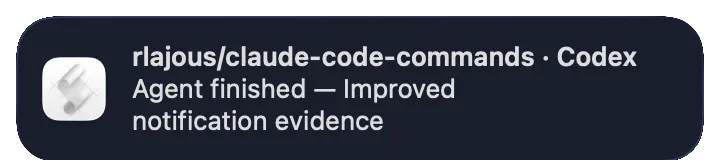
owner/repo · CodexAgent finished — Implemented review activity notificationsClaude uses Claude Code in the title. The summary is the first useful line of
last_assistant_message, with Markdown prefixes removed and a 160-character limit. An empty
summary produces Agent finished. Subagents and agent errors are not notification events in
v2.6.0. Claude completion is also deferred while the hook payload reports background tasks or
session crons.
The daemon reports submitted GitHub reviews on open pull requests authored by the authenticated user:
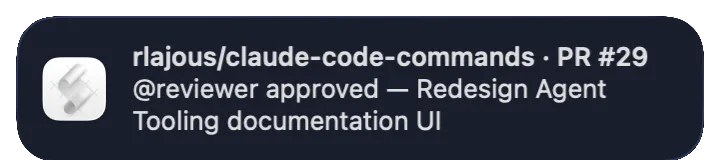
owner/repo · PR #42@alice approved — Fix login redirect
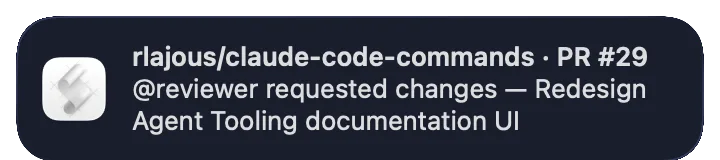
owner/repo · PR #42@alice requested changes — Fix login redirect
owner/repo · PR #42@alice left review feedback — Fix login redirectAPPROVED, CHANGES_REQUESTED, and COMMENTED are supported. A review with several inline
comments still produces one notification because deduplication uses the review node ID. Deleted
accounts appear as unknown reviewer. Reviews submitted by the authenticated user are ignored.
General PR comments, issue comments, CI status, merges, commits, dismissed reviews, agent failures,
and mobile push notifications are outside v2.6.0.
What it looks like
Section titled “What it looks like”These banners were emitted by the packaged macOS notifier. They show the exact identity and message
formats used by v2.6.0; Linux presents the same text through the active desktop’s notify-send
theme.
Main Codex turn completed
A reviewer approved an authored pull request
A reviewer requested changes
The repository includes a side-effect-safe local capture path and two reproducible remote paths. On a Mac already using Dark appearance, install the site dependencies and run:
npm ci --prefix sitebash site/scripts/capture-macos-notifications.sh \ --output .artifacts/macos-notificationsLocal mode is the default; --mode local remains available when an explicit invocation is clearer.
It launches Script Editor hidden only when needed, opens a Ceibo blue-black surface above
every personal window, and captures only Notification Center’s 360×80-point banner region. It does
not change appearance settings and never writes a desktop-sized diagnostic. Before launching Script
Editor for the first time, it snapshots Notification Center and the relevant appearance preferences;
cleanup restores and verifies that snapshot together with Script Editor’s previous running state.
The postprocessor refuses non-uniform corner pixels before converting only the controlled background
to alpha. It then emits the three PNGs and a single-play APNG; no generative image editing is involved.
For remote regeneration, after the repository is connected to Cirrus CI, its
Cirrus task runs in a managed Tart VM
using the free public open-source allocation. The
Capture macOS notification evidence
workflow supports a dedicated runner. Both use --mode runner, call the same packaged notifier used
at runtime, and upload only cropped banner evidence, processing logs, and generated assets. Runner
mode first snapshots the full Notification Center plist and the relevant global appearance keys. Its
exit trap restores and verifies those values after success, failure, or interruption, so a dedicated
runner can be reused safely. No personal desktop, open application, or fabricated browser mockup is
included in the artifacts.
The GitHub Actions fallback targets a dedicated, reusable self-hosted runner labeled macOS and
notification-capture.
GitHub-hosted macOS images are not suitable for this evidence: they expose a graphical desktop but
do not load the per-user Notification Center LaunchAgent required to render banners. A dedicated
remote Mac keeps the capture real while isolating it from a contributor’s personal computer.
One daemon, two GitHub channels
Section titled “One daemon, two GitHub channels”The notifications skill owns one daemon shared with Review Watch:
- 01GitHub
- One GraphQL request
- 02One GraphQL request
- Up to 50 PRs requesting your review
- Up to 50 open PRs authored by you
- 03Up to 50 open PRs authored by you
- Latest 20 reviews per PR
- 04Up to 50 PRs requesting your review
- Review Watch JSONL queue
- 05Review Watch JSONL queue
- Desktop notifier
- 06Latest 20 reviews per PR
- Review-ID baseline and dedupe
- 07Review-ID baseline and dedupe
- Desktop notifier
The two GraphQL searches are optional aliases in the same request. --repo owner/name applies to
both. reviewWatch.enabled controls review-request discovery; notifications.prActivity controls
authored-PR review discovery. Enabling both does not create duplicate polling.
The first run with prActivity: true records all visible existing reviews as a baseline and sends
no PR-activity banners. Only review IDs first observed after that baseline notify. GitHub results
are limited to 50 open PRs in each enabled search and the latest 20 reviews per authored PR.
Daemon-only options are:
--interval <seconds> Override reviewWatch.intervalSeconds--once Poll once and exit--repo owner/name Limit both searches to one repository--force Force review-request polling only--show-config Print resolved configuration and exitHooks and installation modes
Section titled “Hooks and installation modes”Installed plugins load host-specific descriptors that call the same adapter:
| Host | Registration | Invocation |
|---|---|---|
Claude Code plugin | hooks/claude-hooks.json | agent-complete.py --host claude |
Codex plugin | hooks/hooks.json | agent-complete.py --host codex |
Codex source checkout | .codex/hooks.json | Project-local adapter path |
No setup command writes ~/.claude, ~/.codex, or another global configuration file. For a
manual installation that does not load plugin hooks, copy the matching Stop entry into the
host’s project hook configuration and change the command to the absolute installed
skills/notifications/scripts/agent-complete.py path. Merge it with existing hooks rather than
replacing the entire file.
Claude project registration in .claude/settings.json:
{ "hooks": { "Stop": [ { "hooks": [ { "type": "command", "command": "python3 \"/absolute/path/to/skills/notifications/scripts/agent-complete.py\" --host claude", "timeout": 10 } ] } ] }}Codex project registration in .codex/hooks.json uses the same structure with --host codex.
The committed checkout registration resolves its adapter from git rev-parse --show-toplevel so
it remains valid when the checkout moves.
Restart the host after changing hook registration. Use either an installed Codex plugin or checkout-local skill discovery in one session, not both, to avoid duplicate skill entries; concurrent hook deduplication still prevents duplicate completion banners if two equivalent Stop registrations run.
State, deduplication, and privacy
Section titled “State, deduplication, and privacy”Generated state is user-local and outside the repository:
${XDG_STATE_HOME:-$HOME/.local/state}/git-workflow/├── agent-complete-seen # newest 500 host/session/turn digests├── pr-activity-seen # newest 2,000 GitHub review node IDs├── review-watch-seen # newest 500 repo/PR/head-SHA keys└── review-watch-queue.jsonl # pending review requestsThe completion ledger stores a SHA-256 digest, not the assistant message. When a host omits a turn
ID, the adapter prefers transcript path metadata without reading the transcript, then falls back to
the normalized message identity. The notifier receives only the repository label and first line.
The PR daemon stores public PR metadata needed
by Review Watch plus GitHub review IDs; it does not store review bodies or inline comments. State
files are bounded and can be removed to reset deduplication. Removing pr-activity-seen causes the
next run to establish a new silent baseline.
Configuration reference
Section titled “Configuration reference”| Setting | Default | Purpose |
|---|---|---|
notifications.agentComplete | false | Opt into main-turn completion alerts. |
notifications.prActivity | false | Opt into new reviews on authored open PRs. |
notifications.sound | Glass | macOS sound used by all Git Workflow banners. |
reviewWatch.enabled | false | Opt into review-request discovery and queueing. |
reviewWatch.intervalSeconds | 60 | Shared daemon poll interval. |
If notifications.sound is absent, the legacy reviewWatch.sound value remains a compatibility
fallback. Canonical configuration is .git-workflow/config.yaml; .claude/config.yaml is read
only when the canonical file is absent.
Troubleshooting
Section titled “Troubleshooting”- Run the host-correct
notifications --doctor. It validates absolute resources, Bash, Python 3, Node, Git,gh, parsed configuration, hook descriptors, andgh auth statuswithout polling. - If agent completion is silent, confirm
notifications.agentComplete: true, restart the host, and verify that the plugin or projectStophook is loaded. - If PR activity is silent, confirm
notifications.prActivity: true, start the daemon, and remember that the first run is a silent baseline. - If only one repository matters, add
--repo owner/nameto the printed daemon command. - If macOS suppresses banners, allow notifications for the terminal or AppleScript host. On Linux,
verify
notify-sendand the desktop notification service. - If
unknown reviewerappears, GitHub returned a null author, commonly for a deleted account. - If a notification repeats, inspect whether GitHub created a new review node ID; a second review from the same person is intentionally a new event.
See Installation, Commands, Configuration, and Review Watch.